Showing posts with label Computer stuff.. Show all posts

Friday, April 29, 2011

Make It In Mp3 and Find A Subs.

Peace be upon you.

Some of us might facing a problem of only found a song in a video form instead of mp3 form. Well, sometimes I face that kind of problem, yet usually I face a kind of problem regarding the quality if I download the song directly from the 4shared and the other websites. So, youtube is another way to find a song (which is not found in other websites in mp3 form) or to find a good quality.
This is the website to convert from video to mp3.

vidtomp3.com


and this is the website to search for a subtitles. Since one of my fr
iend asked me before about a website to download a subtitles.


Have a nice day. ^^


Sunday, April 24, 2011

Wasted Money !

Peace be upon you..

As I kept my eyes on my desktop, playing FIFA 11, out of the blue I heard my brother spoke to me. He said my notebook doesn't have any wifi problem. He just need to deal with installation of some sort of software.

When I was in Kuantan, the problem of receiving wifi connection was getting worse and worse. Day by day up till my notebook alert with the warning of 'no wireless connection available'. I brought my notebook to computer shop somewhere in Mega Mall. So, the technician there took some time to identify the main problem.

To be short, at first they installed something into my computer. Claimed that kind of thing was missing. Yet, the problem was still unsolved. After that, they did reformat.

"the thing (I forgot the name) was kept infected by the virus". Said the technician.

Expecting to find a way out since they said even we installed it, the virus will infect it. So, reformat is the only way. At last, they claimed that my notebook's wireless receiver was broken. Even he said that he already ask the other technician too. Installed that thing and reformat is the only way to identify the problem.

Paid them some money. Go to another shop to find some wireless adapter instead of invest my money to fix the motherboard. Obviously, that is the cheaper way. Total up, it costs me almost one hundred bucks. Now, I don't even need the wireless adapter ever since my brother already fixed it by did some installation of software. Even my brother said that my notebook's wireless receiver doesn't have any problem.

The irony thing here is...how did the technician did qualified to be 'a technician' ? Go find another job dude. sigh..

Picture of the day said: "for any iPhone user, auto-correct is something usual in text a msg..but this time? haha"


Friday, April 22, 2011

Facebook To Mobile Phone and Maxthon 3.0

Peace be upon you..

In the name of Allah, the Beneficent, the Merciful.

Alright, in this entry I would like to share how we can send a message to our friends' mobile phones using our facebook. What is the advantages ?

1.It means, no money will be used.
2. Let say you are out of credit, and your friend did not even have any facebook account so that you can send a message using facebook.
3. So now, you can use your facebook to send message to your friend's mobile phone.
4. Well, basically, it's worth especially when you don't have any plan today. ^^


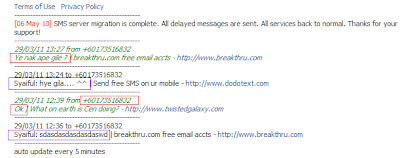
I already used this kind of stuff by the end of march. The rectangle boxes with red line indicates the phone no and the message replied from the phone while the rectangle boxes with purple line indicates the message and the profile of the facebook account used. So, I made this tutorial using my second account.

Follow these simple steps.

1. Go to this link (press Ctrl + left click) dodotext.com

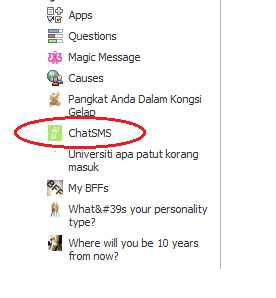
2. Click on 'Add our Facebook application'

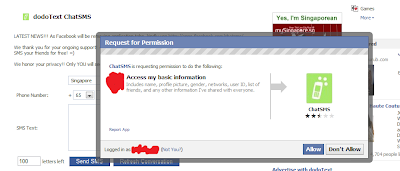
3. Click 'allow'


Annndd done. Choose the country of the recipient. Type the phone number and your message to your friend.

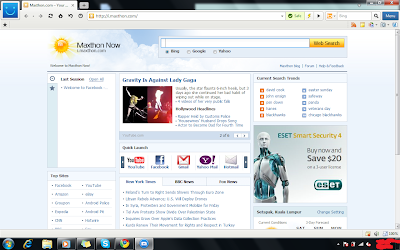
Oh by the way. I just installed a new browser. Way much better than any other browsers.
The advantages ? A lot. This is the information regarding Maxthon 3.0 Browser. Read on the part of full description about Maxthon 3.0.

This is the link to dowload Maxthon 3.0


Enjoy. Peace be upon you. (^-^)


My Laptop My Girlfriend !


Peace be upon you. Now, let me demonstrates to you how to find out your computer's gender. At the same time, research shows that it is almost 99 percents correct to determine whether you are straight or the other way around. :P

*ok, for that part whether you are straight or homo, I'm just kidding. ^^
Now, follow these simple instructions.

1. Open your notepad.

2. Copy and paste this: CreateObject("SAPI.SpVoice").Speak"I love you"

3. Save as computer_gender.vbs

4. Double click on the file that you just saved it. Simple words, run the file.

5. If you heard a male voice, your computer is male and vise versa.

My laptop is female. Hmm..I wonder if she (lenovo a.k.a my sweet lappy) get jealous when ever I pay some attention towards my desktop instead of her. :P

What ever it is, I love you my lappy for all the things that you've done for me.


"awww...so sweeeettt.." Haha..

Alright. Have a nice day. Peace be upon you. ^^